
 Friendlyskies.net
From my Notebook >
Super Dicey Action Hour! (Pascal Dice Roller Source Code)
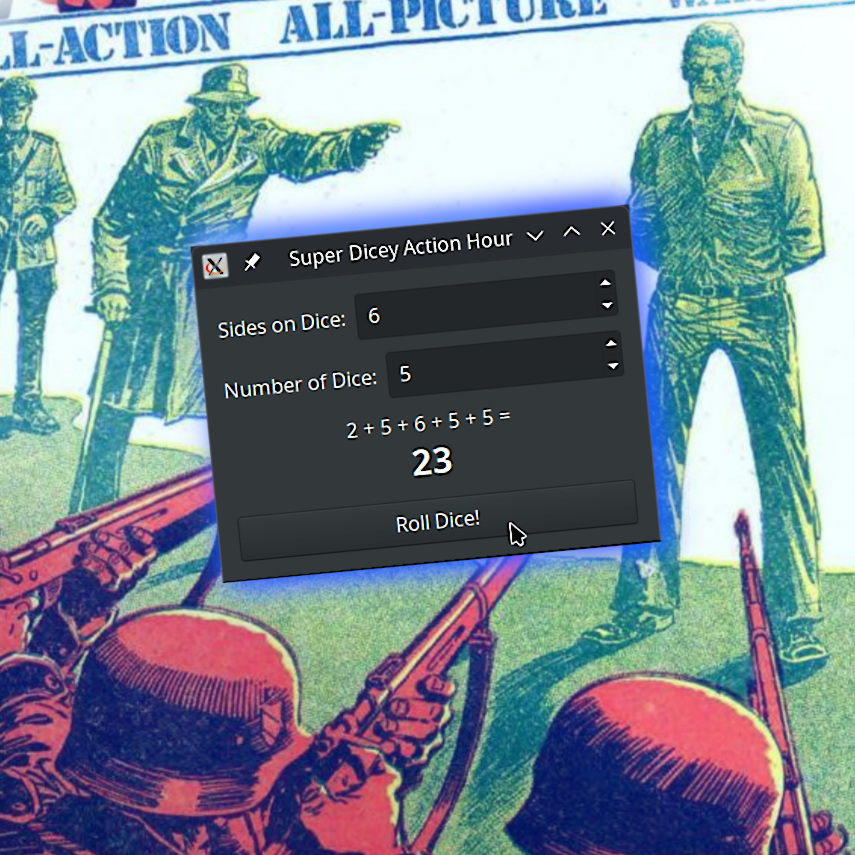
This simple dice-rolling app was developed for Linux + GTK2 as a very simple project. Here’s the source!
// remove this line and uncomment the next to run as a script
// #!/usr/bin/env instantfpc
{$mode objfpc}{$H+}

// suprdice.pas - Super Dicey Action Hour
//
// - shows a simple interface for dice rolling.
// - allows rolling N-sided dice, from 4 to 100 sides.
// - allows rolling N dice total, for rolling an entire dice pool at once.
//
// i use this with Supers! RED but you can use it for anything
// -marc c.

// make sure you have the following units installed
uses
  SysUtils, glib2, gdk2, gtk2;

var
  Window, VBox, HBoxCount, HBoxSides, Button, ResultLabel: PGtkWidget;
  CountSpinner, SidesSpinner, CountLabel, SidesLabel: PGtkWidget;

// callback for when the roll-dice button is clicked
procedure OnButtonClick(widget: PGtkWidget; data: gpointer); cdecl;
var
  NumDice, NumSides, I, Total, Roll: Integer;
  RollsList, FinalMarkup: string;
begin
  // show "rolling..." label immediately
  gtk_label_set_markup(PGtkLabel(ResultLabel), '<span size="large" style="italic">Rolling...</span>');

  // force gtk to process event queue and repaint the window
  while gtk_events_pending() <> 0 do
    gtk_main_iteration();

  // short pause for visual feedback (150ms)
  g_usleep(150000);

  // read spinner values
  NumDice := gtk_spin_button_get_value_as_int(PGtkSpinButton(CountSpinner));
  NumSides := gtk_spin_button_get_value_as_int(PGtkSpinButton(SidesSpinner));

  Total := 0;
  RollsList := '';

  // roll dice based on custom side count
  for I := 1 to NumDice do
  begin
    Roll := Random(NumSides) + 1;
    Total := Total + Roll;

    if I = 1 then
      RollsList := IntToStr(Roll)
    else
      RollsList := RollsList + ' + ' + IntToStr(Roll);
  end;

  // build output string with a newline + large font for the total
  if NumDice = 1 then
  begin
    FinalMarkup := Format(
      '<span>Result (%dd%d):</span>' + #10 +
      '<span size="xx-large" weight="bold">%d</span>',
      [NumDice, NumSides, Total]
    );
  end
  else
  begin
    FinalMarkup := Format(
      '<span>%s =</span>' + #10 +
      '<span size="xx-large" weight="bold">%d</span>',
      [RollsList, Total]
    );
  end;

  gtk_label_set_markup(PGtkLabel(ResultLabel), PChar(FinalMarkup));
end;

// callback when window close button is pressed
function OnDeleteEvent(widget: PGtkWidget; event: PGdkEvent; data: gpointer): gboolean; cdecl;
begin
  gtk_main_quit();
  Result := False;
end;

// this is the main program
begin
  Randomize;

  // initialize GTK
  gtk_init(@argc, @argv);

  // mamke top-level window
  Window := gtk_window_new(GTK_WINDOW_TOPLEVEL);
  gtk_window_set_title(PGtkWindow(Window), 'Super Dicey Action Hour');
  gtk_window_set_default_size(PGtkWindow(Window), 360, 220);
  gtk_container_set_border_width(PGtkContainer(Window), 15);
  g_signal_connect(Window, 'delete-event', G_CALLBACK(@OnDeleteEvent), nil);

  // main vertical box container
  VBox := gtk_vbox_new(FALSE, 10);
  gtk_container_add(PGtkContainer(Window), VBox);

  // dice sides spinner row (min=2, max=100, step=1, default=4)
  HBoxSides := gtk_hbox_new(FALSE, 8);
  SidesLabel := gtk_label_new('Sides on Dice:');
  SidesSpinner := gtk_spin_button_new_with_range(2, 100, 1);
  gtk_spin_button_set_value(PGtkSpinButton(SidesSpinner), 6); // Starts at 4

  gtk_box_pack_start(PGtkBox(HBoxSides), SidesLabel, FALSE, FALSE, 0);
  gtk_box_pack_start(PGtkBox(HBoxSides), SidesSpinner, TRUE, TRUE, 0);
  gtk_box_pack_start(PGtkBox(VBox), HBoxSides, FALSE, FALSE, 0);

  // count spinner row (min=1, max=100, step=1, default=3)
  HBoxCount := gtk_hbox_new(FALSE, 8);
  CountLabel := gtk_label_new('Number of Dice:');
  CountSpinner := gtk_spin_button_new_with_range(1, 100, 1);
  gtk_spin_button_set_value(PGtkSpinButton(CountSpinner), 4);

  gtk_box_pack_start(PGtkBox(HBoxCount), CountLabel, FALSE, FALSE, 0);
  gtk_box_pack_start(PGtkBox(HBoxCount), CountSpinner, TRUE, TRUE, 0);
  gtk_box_pack_start(PGtkBox(VBox), HBoxCount, FALSE, FALSE, 0);

  // result labell ...this supports pango's html-like markup
  ResultLabel := gtk_label_new(nil);
  gtk_label_set_justify(PGtkLabel(ResultLabel), GTK_JUSTIFY_CENTER);
  gtk_label_set_markup(PGtkLabel(ResultLabel), 'awaiting ur click');
  gtk_box_pack_start(PGtkBox(VBox), ResultLabel, TRUE, TRUE, 0);

  // roll button
  Button := gtk_button_new_with_label('Roll Dice!');
  g_signal_connect(Button, 'clicked', G_CALLBACK(@OnButtonClick), nil);
  gtk_box_pack_start(PGtkBox(VBox), Button, FALSE, FALSE, 0);

  // display window and run
  gtk_widget_show_all(Window);
  gtk_main();
end.
That’s it! Enjoy
Code is provided as-is with no warranty; use at your own discretion. CC-BY-SA